
English
Event Bridge Setup
Search Business Central for Event Bridge Setup (or rabbitmq / service bus / event broker) to open it. It's a single, company-wide configuration page — there's no per-table override of endpoint or authorization, only which fields and event types each Event Table sends.
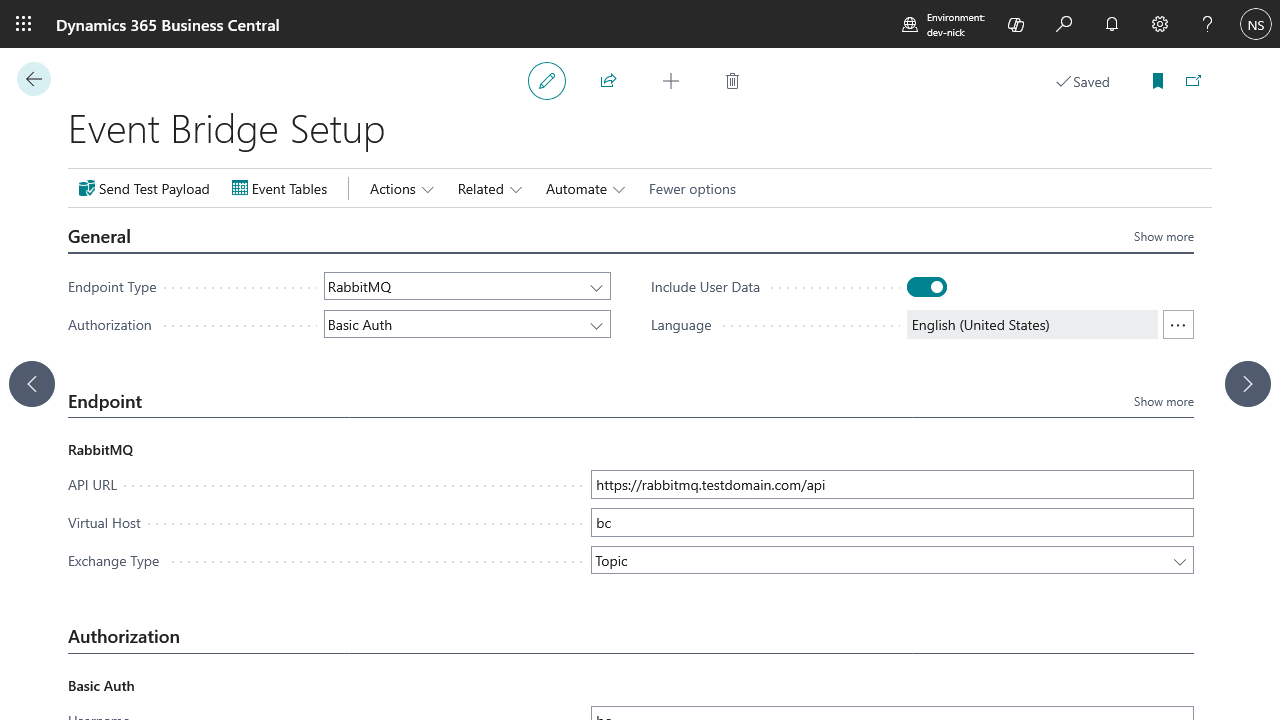
General
| Field | Notes |
|---|---|
| Endpoint Type | RabbitMQ, API endpoint, Azure Service Bus, Azure Event Hub, Azure Queue Storage, or Azure Event Grid — picks which group of fields below applies, and how events are shaped when sent. |
| Authorization | No Auth, Basic Auth, API Key, OAuth 2.0, Azure SAS Token, Storage SAS Token, or Event Grid SAS Token — picks which authorization group below applies. Not every Endpoint Type accepts every authorization method; see Authentication for which combinations are valid and why. |
| Include User Data | Adds the acting user's ID, name, and e-mail to every event's headers, for audit trails or error tracking. This may contain personal data — only turn it on if your downstream system is meant to receive it. |
| Language | The language used both to interpret Insert/Modify filters and to format Option/Enum field values in the JSON payload. This keeps output consistent regardless of which user's action triggered the event — without it, an Enum field's text could come out in whatever language the acting user happened to be signed in with. Defaults to English (US); use the field's lookup to change it. |
| Max Retry Attempts | How many times a failed event is retried automatically before it's marked Error in the Event Queue — only for retriable failures (a network error, or an HTTP 5xx, 408, or 429 response); anything else fails immediately without retrying. 1–10, defaults to 5. See Event Queue → How delivery works. |
Endpoint
API URL (RabbitMQ) and API Endpoint (API endpoint) are the only two fields here where you point at a URL of your own choosing — every other Endpoint Type is a fixed Microsoft cloud service assembled from a namespace or account name and always uses HTTPS. If either of those two fields starts with http://, Business Central highlights it yellow (Ambiguous) as a warning, not a hard block — it still saves and works. Over HTTPS, TLS already gives you encryption and integrity for the whole request, headers included, so nobody on the network path can read or alter it; plain HTTP has none of that, so everything sent to it — including your authorization credentials — travels in the clear. Only point these at http:// for local testing against a broker or endpoint you control; use https:// for anything reaching production.
RabbitMQ (Endpoint Type = RabbitMQ)
| Field | Notes |
|---|---|
| API URL | The RabbitMQ Management API base URL. Must start with http:// or https://; trailing slashes are stripped automatically. |
| Virtual Host | The RabbitMQ virtual host to publish into. Leading/trailing slashes are stripped automatically. |
| Exchange Type | Direct, Fanout, Headers, Topic (default), or Custom. Must match how the exchange is actually configured in RabbitMQ. |
| Custom Exchange | The name of an exchange you've already created in the RabbitMQ virtual host. Only editable — and required — when Exchange Type is Custom; ignored otherwise. Can't start with amq., which RabbitMQ reserves for its own built-in exchanges. |
| Publish URL | Read-only. The full URL events are POSTed to, built from the fields above as {API URL}/exchanges/{Virtual Host}/{Exchange Name}/publish — the exchange name is one of the built-in AMQP defaults (amq.direct, amq.fanout, amq.headers, amq.topic) matching Exchange Type, or Custom Exchange's value when Exchange Type is Custom. Useful for confirming the other fields combine into what you expect. |
Only accepts No Auth, Basic Auth, or OAuth 2.0 authorization — see Authentication.
API endpoint (Endpoint Type = API endpoint)
| Field | Notes |
|---|---|
| API Endpoint | The URL that receives a plain JSON POST for every event. |
Only accepts No Auth, Basic Auth, API Key, or OAuth 2.0 authorization — see Authentication. For step-by-step guidance pointing this at Zapier, Make.com, or Power Automate, see Zapier, Make.com & Power Automate.
Azure Service Bus (Endpoint Type = Azure Service Bus)
| Field | Notes |
|---|---|
| Namespace | The Service Bus namespace, e.g. mynamespace — without the .servicebus.windows.net suffix, which is stripped automatically if you paste it in anyway. |
| Queue/Topic Name | The name of the Service Bus queue or topic to publish messages to. Leading/trailing slashes are stripped automatically. |
| Publish URL | Read-only. The full URL events are POSTed to, built from the two fields above — useful for confirming they combine into what you expect. |
Only accepts OAuth 2.0 or an Azure SAS Token — see Authentication.
Azure Event Hub (Endpoint Type = Azure Event Hub)
| Field | Notes |
|---|---|
| Namespace | The Event Hubs namespace, e.g. mynamespace — without the .servicebus.windows.net suffix, which is stripped automatically if you paste it in anyway. |
| Event Hub Name | The name of the Azure Event Hub to publish events to. Leading/trailing slashes are stripped automatically. |
| Publish URL | Read-only. The full URL events are POSTed to, built from the two fields above — useful for confirming they combine into what you expect. |
Only accepts OAuth 2.0 or an Azure SAS Token — see Authentication.
Azure Queue Storage (Endpoint Type = Azure Queue Storage)
| Field | Notes |
|---|---|
| Storage Account Name | The Azure Storage account name, e.g. mystorageaccount — without the .queue.core.windows.net suffix, which is stripped automatically if you paste it in anyway. |
| Queue Name | The name of the Azure Storage queue to publish messages to. Must be lowercase; it's lowercased automatically if you type it in mixed case. |
| Publish URL | Read-only. The full URL events are POSTed to, built from the two fields above — useful for confirming they combine into what you expect. |
Only accepts OAuth 2.0 or a Storage SAS Token — see Authentication.
Azure Event Grid (Endpoint Type = Azure Event Grid)
| Field | Notes |
|---|---|
| Topic Endpoint | The Event Grid topic's endpoint URL, copied from Overview on the topic in the Azure Portal, e.g. https://mytopic.westus2-1.eventgrid.azure.net/api/events. Must start with http:// or https://; trailing slashes are stripped automatically. |
Only accepts API Key, OAuth 2.0, or an Event Grid SAS Token — see Authentication. If you use API Key, the Key field below must be set to aeg-sas-key, the header name Event Grid expects. The topic must also be configured for Event Grid Schema, not CloudEvents v1.0 — see Authentication → Azure Event Grid.
Payload size limits
Event Bridge doesn't cap payload size itself — how many fields you can register on a table before an event gets rejected depends entirely on the endpoint's own REST API limit:
| Endpoint | REST call it hits | Size limit |
|---|---|---|
| API endpoint | Whatever URL you configure | No limit from Event Bridge — entirely up to the receiving server. |
| RabbitMQ | Management plugin POST /api/exchanges/{vhost}/{exchange}/publish | Governed by the broker's management.http_max_body_size setting (commonly tens of MB) — but RabbitMQ's own documentation describes this endpoint as being for test messages only, not production traffic. |
| Azure Queue Storage | Storage Put Message REST API | 64 KB on the wire, a hard limit. Event Bridge base64-encodes the JSON into <QueueMessage><MessageText>, so once the ~33% base64 overhead and XML wrapper are accounted for, the raw JSON payload effectively caps out around ~47 KB. |
| Azure Service Bus | Brokered messaging POST .../messages | 256 KB per message on the Standard tier. Premium tier: 1 MB by default, up to 100 MB if large messages is explicitly enabled on the namespace. |
| Azure Event Hub | POST .../messages (Send Event) | 1 MB per event on the Standard tier (raised from the older 256 KB cap). Premium/Dedicated capacity units can be configured higher. |
| Azure Event Grid | Custom topic Publish Events REST API | 1 MB per event, and 1 MB per batch/request. Event Bridge always sends one event per call, so that 1 MB covers the whole wrapped event object (id, subject, eventType, eventTime, data.headers + data.payload, dataVersion) — not just your payload fields. |
If you're close to a limit: Include Previous Values roughly doubles the payload with its before/after comparison, and Include User Data adds a small, fixed amount of metadata on top — embedded directly in the body for RabbitMQ, Azure Queue Storage, and Azure Event Grid specifically (see Headers & properties). Rather than estimating by hand, check Message Preview — it shows the actual estimated size of the wire body for a real record before you register it in production.
Authorization
Which authorization methods are available depends on the Endpoint Type selected above — see Authentication for the full compatibility matrix and field reference for each of No Auth, Basic Auth, API Key, OAuth 2.0, Azure SAS Token, Storage SAS Token, and Event Grid SAS Token.
Actions
- Send Test Payload (Processing) — sends a single dummy event straight to the configured endpoint using whatever Endpoint Type and Authorization are currently set, independent of any registered table. Confirms your connection settings work before you register real tables. See Testing & Troubleshooting.
- Schedule Automatic Retries (Processing) — creates a recurring job queue entry (every 5 minutes) that resets stuck Event Queue entries and picks up any table whose delivery got lost. Set this up once as a safety net — see Event Queue → How delivery works.
- Event Tables (Navigation) — opens the list of tables currently registered for events. See Event Tables.
- Event Queue (Navigation) — opens the list of every captured event and its delivery status. See Event Queue.
Who can open this page
Configuring Setup needs the Event Bridge Admin permission set — see Licensing and access for how that's assigned.